I have a doorbell camera in the UniFi Protect ecosystem. I wanted a way to show the doorbell stream on a low cost wall mounted display that integrates will with the existing home automations.
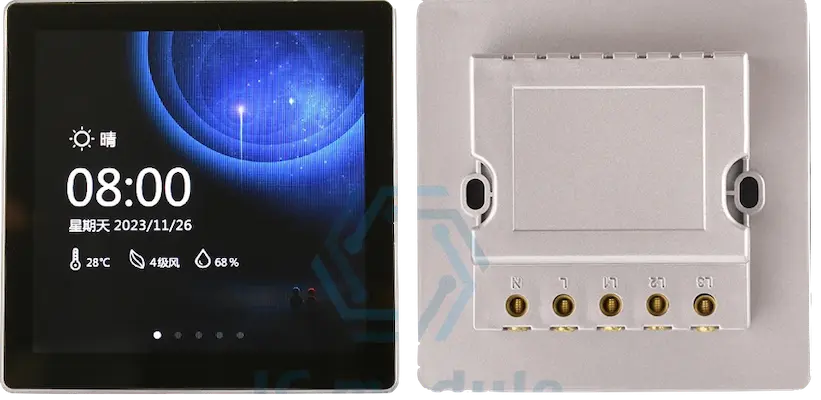
I have a pair of these ESP32-S3 based screens, they are very common on aliexpress under the name “ESP32-S3 Development Board LVGL 4.0 inch 480*480 Smart Display”. I paid $40AUD or less for them. They consist of a front touch display connected to an ESP32-S3, with then an extra (optional) board that clips on the back that has a power supply and relay output. For my use case I generally dont use the relay so I can’t talk to how it performs.
Once you pick these up, you can easily flash ESPHome onto them over the USB port. Note that I always flash them without the mains connected
The ESP32-S3 is just about powerful enough to make these into a nice display unit when showing camera snapshots.
I have not found a way to show actual video feed on these units. Sadly, UniFi’s intercom viewer, which is perfect for what I want, doesnt work with just the doorbell.
This is my slightly compromised solution that has been running for months without issue.
The pipline uses the Home Assistant UniFi Protect addon to fetch the snapshot url for the video feed. Then this is processed via imgproxy to make a smaller image and resized to suit the display. This is then drawn on the display every few seconds.
To set this up I have:
- UniFi G4 doorbell
- Home Assistant Yellow
- Home Assistant UniFi
- Home NAS running imgproxy
- ESP32-S3 display mounted in the wall
The ESPHome configuration is as follows:
http_request:
  verify_ssl: false

text_sensor:
  - platform: homeassistant
    id: doorbell_snapshot_url
    entity_id: camera.g4_doorbell_high_resolution_channel
    attribute: entity_picture
    internal: true
    on_value:
      # Update the online_image URL whenever HA provides a new token
      then:
        - online_image.set_url:
            id: doorbell_image_source
            # Combine HA base URL with the relative path from the sensor
            url: !lambda |-
                            std::string original = "http://<Home Assistant IP>:8123" + x;
                            // Convert string to a vector of bytes
                            std::vector<uint8_t> data(original.begin(), original.end());
                            // Encode
                            std::string encoded = esphome::base64_encode(data);
                            return "http://<ImgProxyIP:Port>/unsafe/rs:fill:480:240/" + encoded + ".jpg";


# 2. Define the image source
online_image:
  - id: doorbell_image_source
    type: RGB565
    format: jpg
    url: "http://localhost/placeholder.jpg"
    # Set to 'never' because we will trigger it manually every 10s
    update_interval: 3s
    resize: 480x240
    on_download_finished:
      # This ensures the LVGL widget updates once the data is ready
      then:
        - lvgl.image.update:
            id: doorbell_lvgl_widget
            src: doorbell_image_source

lvgl:
  id: lvgl_main
  pages:
    - id: main_page
      layout: 4x4
      widgets:
        - container:
            id: video
            grid_cell_x_align: stretch
            grid_cell_y_align: stretch
            grid_cell_row_pos: 2
            grid_cell_column_pos: 0
            grid_cell_row_span: 2
            grid_cell_column_span: 4
            widgets:
              - image:
                  id: doorbell_lvgl_widget
                  src: doorbell_image_source
                  width: 100%
                  height: 100%
                  align: CENTER